
You spend money on ads. You optimize your SEO. You launch a referral program.
Traffic comes. Clicks happen. But leads? Not enough. Conversions? Even fewer.
The easy answer: “The traffic is bad.”
Sometimes that’s true. But often, the real problem is not the channel – it’s what happens after the click.
Even high-quality traffic will underperform if your lead capture, response time, or qualification systems are weak.
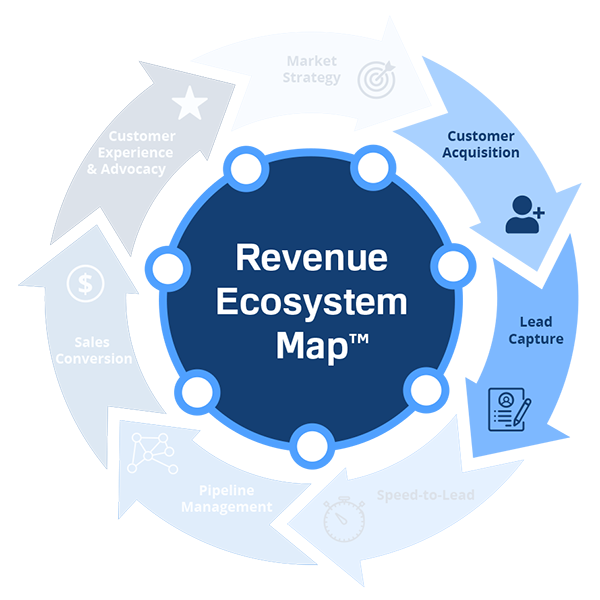
The Three Places Good Traffic Dies
1. Lead Capture
- Forms that are too long or broken.
- Phone numbers that go to voicemail with no callback.
- No chat or text option for quick questions.
- Booking flows that confuse prospects.
Result: Prospects abandon before they ever become leads.
2. Speed-to-Lead
- Response time measured in hours, not minutes.
- No lead alerts – reps don’t know leads arrived.
- After-hours inquiries sit until morning.
Result: Leads contact competitors who respond faster.
3. Qualification
- No separation between cold and warm leads.
- Sales spends time on unready prospects.
- Marketing and sales disagree on what a “qualified lead” means.
Result: Sales efficiency drops, close rates fall, reps get frustrated.
You can have perfect traffic and still get zero customers if your capture, response, and qualification systems are broken.
Why Blaming the Channel Is Expensive
When acquisition underperforms, the default reaction is:
- Pause the channel.
- Lower bids.
- Fire the agency.
- Redirect budget.
Each of those moves costs time and money. And if the real problem was downstream, you just killed a potentially profitable channel for the wrong reason.
Example:
- You spend $10k/month on Google Ads.
- Traffic volume is good, but leads are low.
- You assume the keywords are wrong.
- You redo campaigns, spend another $5k, still low leads.
Meanwhile, your lead capture form has a broken CAPTCHA, and response time is 4 hours. Fix those, and the same ads start working.
Result: You wasted $15k because you didn’t look downstream.
How to Diagnose the Real Problem
Before you kill a channel, run this diagnostic:
Step 1 – Check Lead Capture
- Submit a test lead yourself. Does the form work? Does it send an auto-reply? Does a human reach out?
- Call your sales number after hours. Is there a voicemail? Is it returned?
Step 2 – Measure Speed-to-Lead
- Average response time for new leads (not just calls, all channels).
- Percentage of leads contacted within 5 minutes.
- Missed lead count.
Step 3 – Review qualification
- What criteria does sales use to accept a lead? (Must be written.)
- Do marketing and sales agree on those criteria?
- What happens to leads that don’t qualify instantly? (Nurture? Discard?)
Step 4 – Compare channel performance by downstream metrics
- Don’t compare channels by cost per lead alone.
- Compare by cost per qualified opportunity, cost per sale, and customer lifetime value.
A channel with higher CPL but much higher close rate may be your best investment.
How the Self-Assessment Helps
The Revenue System Self-Assessment™ includes specific questions about:
- Lead Capture reliability (do you miss calls or form submissions?)
- Response time (measured vs assumed)
- Qualification process (written vs verbal)
If you score low in Customer Acquisition or Lead Capture, the assessment will flag them as priority leaks.
What to Fix First (Quick Wins)
If Lead Capture is the problem:
- Shorten forms to 3-5 fields.
- Install a call tracking number with missed-call alerts.
- Add a “schedule a call” button above the fold.
If Speed-to-Lead is the problem:
- Set up instant SMS or Slack alerts for new leads.
- Define a service-level agreement (SLA): “All leads contacted within 5 minutes.”
- Automate after-hours replies with a callback promise.
If qualification is the problem:
- Write 5 qualifying questions (e.g., budget, authority, need, timeline).
- Train reps to ask them on every call.
- Create a “nurture” segment for leads not ready to buy.
We’ve seen companies double conversion rates in 2 weeks just by fixing lead capture and response time – without changing any channels.
The Estimator Connection
Our Revenue Leakage Estimator™ includes modules for:
- Missed leads (capture leakage)
- Slow response (Speed-to-Lead impact)
Use it to put a dollar figure on what your acquisition leaks are costing you. Then prioritize fixes based on ROI.
Good traffic can look bad when your downstream systems are weak.
Before you kill a channel, check your lead capture, response time, and qualification. Fix those first. Then reevaluate the channel.
You might find that the traffic was never the problem – the system behind it was.